You write a careful prompt. Ninety words about the product, the surface, the light, the mood. The image comes back and it is eighty per cent right — the mug looks good, the light is clean — but it is standing on concrete and your brand is warm oak.
So you edit the prompt. You swap concrete for oak table, hit generate, and the mug is now a different mug. The light has moved. The composition you liked is gone. You did not get a corrected image. You got a new one.
That is not a prompt-writing problem, and no amount of prompt-engineering advice will fix it. It is a workflow problem.
Why changing one word changes everything
Most image tools treat every generation as independent. Your text is the only input; the model never sees what it produced a minute ago. Change one word and you have not asked for an edit — you have asked for a brand-new picture that happens to share most of a description. Everything you did not explicitly pin down is re-rolled: the object, the angle, the lens, the shadows.
The fix is structural. Hand the previous image back to the model together with your correction, so that put it on oak instead means edit this rather than imagine something similar.
What that looks like on a real shot
Below are four rounds on a single product image. Round 1 is the only place a long prompt appears. Rounds 2 to 4 contain nothing but the change.
Round 1 — describe the scene once
Editorial product photograph of a matte black ceramic coffee mug standing on a pale grey concrete surface, soft diffused window light from the left, clean minimal composition, shallow depth of field, no people, no text
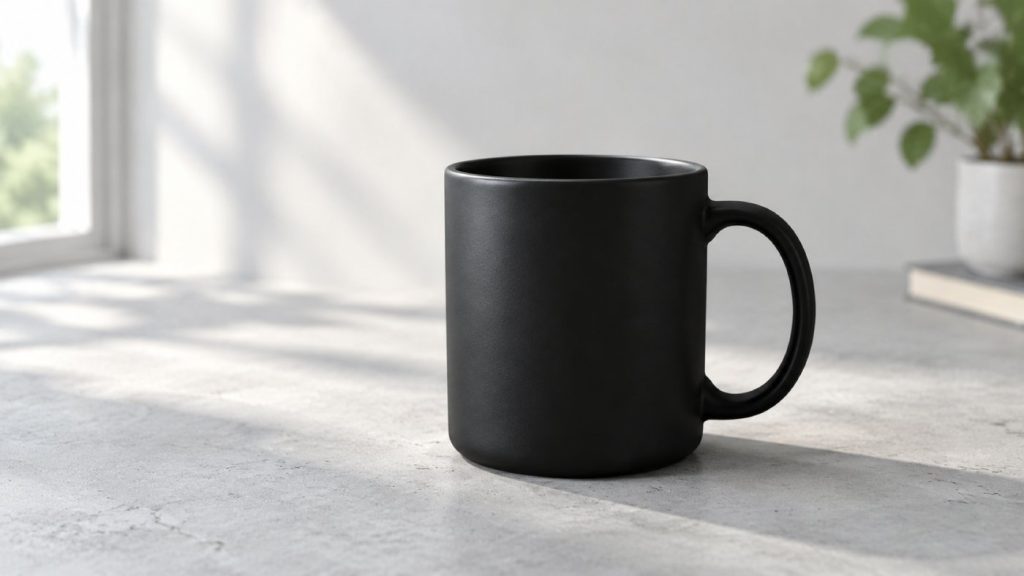
Spend your effort here. This is the one prompt where being specific pays for itself, because everything after it inherits this frame.
Round 2 — change the set
Put the mug on a warm oak table instead, and add a folded linen cloth in the background
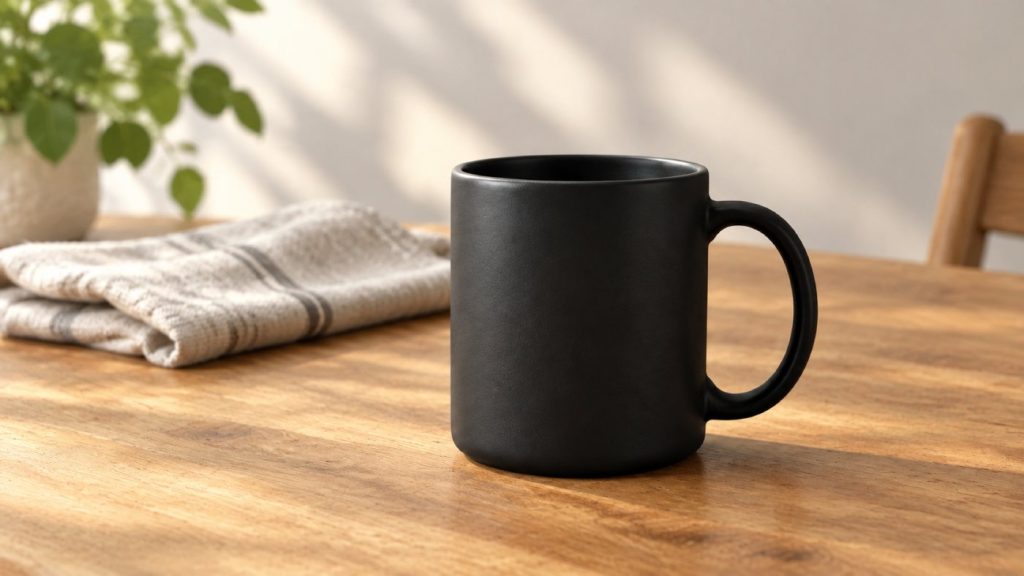
Same mug, same angle, same depth of field. Only the surface and the props moved. Notice what you did not have to retype: the material of the mug, the direction of the light, the fact that there should be no text in the frame.
Round 3 — change the light
Make the light warmer, like late afternoon

Eleven words. The composition is untouched, the linen is still folded the same way, and the mug is still the mug. This is the round that is hardest to do by editing a prompt, because "warmer light" buried inside ninety other words competes with everything else in the sentence.
Round 4 — make room for the headline
Move the mug to the left and leave the right side empty for text

This is the round that matters if the image is going into an ad, a hero banner, or an email header. Designers rarely need a beautiful centred product shot; they need negative space in a specific place. Asking for it as a final adjustment is far more reliable than trying to specify it up front, before you know what the scene looks like.
Four rules that make the loop work
- Change one thing per round. If you ask for a new surface and new light in the same sentence, you lose the ability to tell which instruction caused which change — and you are back to guessing.
- Describe what you would see, not what you would call it. "Long shadows and orange light" lands more consistently than "golden hour mood". Art-direction vocabulary is compression for people who already share your references; the model does better with the physical description underneath it.
- Do composition last. Moving the subject or opening up copy space rearranges the frame. Do it after the set and the light are settled, or you will redo it.
- Pick the aspect ratio before round 1. In Nystrel the ratio locks once a conversation starts, precisely so that a later round cannot silently reframe everything you have built. If you need both a 16:9 banner and a 1:1 post, run two conversations.
What this does not solve
An honest limit, because it matters more than anything above: a generated image is not a photograph of your product. The mug in these four rounds does not exist. It is a plausible mug.
That is fine for concepts, mood boards, layout comps, background plates, and social content where the subject is generic. It is not fine for depicting the specific item a customer is buying. Showing a generated image as the product someone is about to receive is misleading advertising in most jurisdictions, and several marketplaces prohibit it outright in their listing rules. When the image is the thing being sold, you still need a camera.
The useful reading of that boundary: this workflow replaces the iteration that used to require a second shoot — not the shoot itself.
Try the loop
The four images above came out of one conversation: one opening prompt and three short corrections. If you have been rewriting whole prompts to fix a single detail, the loop is worth trying on your next brief.
Start with 300 free credits — no card required